Online WUXINJI Schematic Diagram Bitmap for iPhone iPad Samsung
WUXINJI Drawing Schematics Online Software V6.0 version for Mobile Phone Repair (one account can be used on three computers simultaneously.) WUXINJI schematics professional phone repair service platform integrates motherboard diagrams, HD bitmaps, IC component layout diagrams, and motherboard resistance diagrams for iPhone 6-17 series and Androids from Huawei, Samsung, etc. It also includes mobile phone repair video tutorials and repair cases, aiming to provide technicians with comprehensive technical support from basic circuit tracing to advanced motherboard-level repair. Compatible with Apple and Windows operating systems and is a professional-grade tool for the mobile phone repair industry.
How to Use WUXINJI Drawing?
1. Download the software (supports Windows and MacBook systems): https://english.wuxinji.com.
2. Register with your email address.
3. Reopen the Wuxinji software and log in with your account and password.
4. Click "Recharge/Renewal," select "VIP Card Account Recharge," enter the account name to be recharged, and then enter the activation account's serial number (SN) and key.
Please note:
1. After completing your order, please contact us to obtain the activation code.
WhatsApp: +86-157-6795-6655
WhatsApp Me: https://wa.me/message/M4MSQA44Y4TAJ1
2. The validity period is calculated from the date of activation.
Features:
1. Simultaneous Multi-Device Access: A highly cost-effective licensing model that allows a single account to be logged in and used on up to three computers simultaneously.
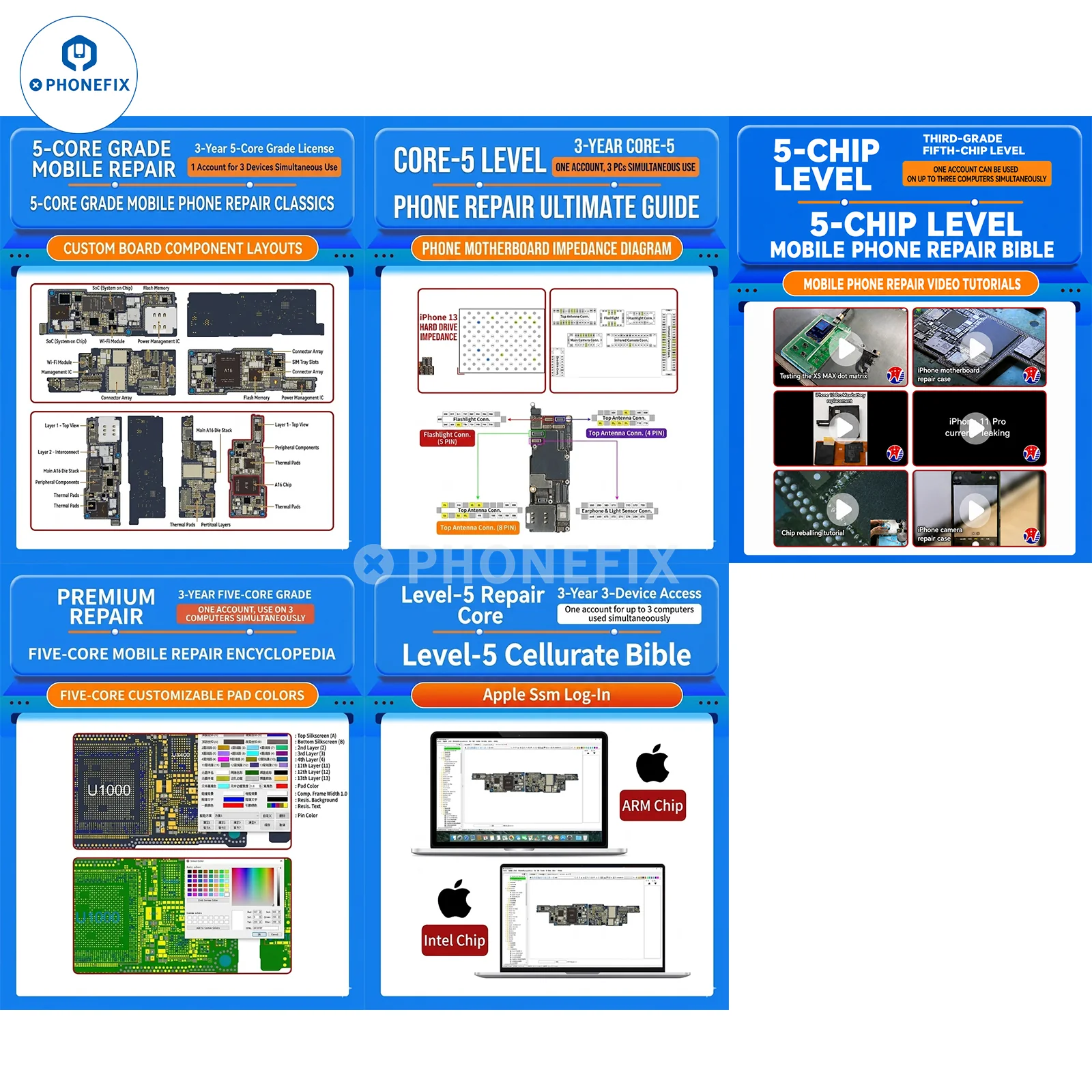
2. Multi-Layer/Single-Layer Circuit Diagrams: Clearly visualizes the internal routing layers of the motherboard.
3. HD 2D Component Maps: Realistically renders the actual appearance and silkscreen markings of components (e.g., A16 chips, inductor identifiers, etc.) in real-time.
4. Dual-View Mode: Supports synchronized display and interaction between component placement maps and schematics on a single screen, with automatic matching of search results.
5. Advanced Repair Data: Provides detailed ground resistance maps, test point data, and tens of thousands of real-world repair case studies (e.g., single-SIM to dual-SIM conversions, signal troubleshooting, camera circuit repairs, etc.).
6. Custom Editing: Allows users to customize pad colors, component positions, and parameter annotations to suit their individual repair preferences and workflows.
7. One-Click Image Export: Enables the direct export of high-definition images of specific motherboard sections to the desktop for convenient offline viewing or instructional demonstrations.
8. Multimedia Tutorials: Features a vast library of built-in HD video tutorials covering popular mobile phone repair topics, such as fixing power leakage issues on the iPhone 11 Pro, Dot Projector (Face ID) repair, and more.
Supported Models/Content:
· Multimedia Tutorials: Features a vast library of built-in HD video tutorials covering popular mobile phone repair topics, such as fixing power leakage issues on the iPhone 11 Pro, Dot Projector (Face ID) repair, and more.
· System Compatibility: Supports Windows operating systems and Apple Mac operating systems (compatible with M1/M2/M3 ARM chips as well as Intel chips).
· Diagram Types: Multi-layer diagrams, 2D physical component maps, component placement maps, schematics, block diagrams, and resistance maps.
· Language Support: Bilingual interface (Chinese/English) for all annotations (e.g., circuit labels, video thumbnails, etc.).
· Update Cycle: Continuous updates, closely following the release schedule of the latest mobile phone models.
Product Information
Product Information
Shipping & Returns
Shipping & Returns




Online WUXINJI Schematic Diagram Bitmap for iPhone iPad Samsung
Online WUXINJI Schematic Diagram Bitmap for iPhone iPad Samsung
WUXINJI Drawing Schematics Online Software V6.0 version for Mobile Phone Repair (one account can be used on three computers simultaneously.) WUXINJI schematics professional phone repair service platform integrates motherboard diagrams, HD bitmaps, IC component layout diagrams, and motherboard resistance diagrams for iPhone 6-17 series and Androids from Huawei, Samsung, etc. It also includes mobile phone repair video tutorials and repair cases, aiming to provide technicians with comprehensive technical support from basic circuit tracing to advanced motherboard-level repair. Compatible with Apple and Windows operating systems and is a professional-grade tool for the mobile phone repair industry.
How to Use WUXINJI Drawing?
1. Download the software (supports Windows and MacBook systems): https://english.wuxinji.com.
2. Register with your email address.
3. Reopen the Wuxinji software and log in with your account and password.
4. Click "Recharge/Renewal," select "VIP Card Account Recharge," enter the account name to be recharged, and then enter the activation account's serial number (SN) and key.
Please note:
1. After completing your order, please contact us to obtain the activation code.
WhatsApp: +86-157-6795-6655
WhatsApp Me: https://wa.me/message/M4MSQA44Y4TAJ1
2. The validity period is calculated from the date of activation.
Features:
1. Simultaneous Multi-Device Access: A highly cost-effective licensing model that allows a single account to be logged in and used on up to three computers simultaneously.
2. Multi-Layer/Single-Layer Circuit Diagrams: Clearly visualizes the internal routing layers of the motherboard.
3. HD 2D Component Maps: Realistically renders the actual appearance and silkscreen markings of components (e.g., A16 chips, inductor identifiers, etc.) in real-time.
4. Dual-View Mode: Supports synchronized display and interaction between component placement maps and schematics on a single screen, with automatic matching of search results.
5. Advanced Repair Data: Provides detailed ground resistance maps, test point data, and tens of thousands of real-world repair case studies (e.g., single-SIM to dual-SIM conversions, signal troubleshooting, camera circuit repairs, etc.).
6. Custom Editing: Allows users to customize pad colors, component positions, and parameter annotations to suit their individual repair preferences and workflows.
7. One-Click Image Export: Enables the direct export of high-definition images of specific motherboard sections to the desktop for convenient offline viewing or instructional demonstrations.
8. Multimedia Tutorials: Features a vast library of built-in HD video tutorials covering popular mobile phone repair topics, such as fixing power leakage issues on the iPhone 11 Pro, Dot Projector (Face ID) repair, and more.
Supported Models/Content:
· Multimedia Tutorials: Features a vast library of built-in HD video tutorials covering popular mobile phone repair topics, such as fixing power leakage issues on the iPhone 11 Pro, Dot Projector (Face ID) repair, and more.
· System Compatibility: Supports Windows operating systems and Apple Mac operating systems (compatible with M1/M2/M3 ARM chips as well as Intel chips).
· Diagram Types: Multi-layer diagrams, 2D physical component maps, component placement maps, schematics, block diagrams, and resistance maps.
· Language Support: Bilingual interface (Chinese/English) for all annotations (e.g., circuit labels, video thumbnails, etc.).
· Update Cycle: Continuous updates, closely following the release schedule of the latest mobile phone models.
Original: $35.00
-65%$35.00
$12.25Product Information
Product Information
Shipping & Returns
Shipping & Returns
Description
WUXINJI Drawing Schematics Online Software V6.0 version for Mobile Phone Repair (one account can be used on three computers simultaneously.) WUXINJI schematics professional phone repair service platform integrates motherboard diagrams, HD bitmaps, IC component layout diagrams, and motherboard resistance diagrams for iPhone 6-17 series and Androids from Huawei, Samsung, etc. It also includes mobile phone repair video tutorials and repair cases, aiming to provide technicians with comprehensive technical support from basic circuit tracing to advanced motherboard-level repair. Compatible with Apple and Windows operating systems and is a professional-grade tool for the mobile phone repair industry.
How to Use WUXINJI Drawing?
1. Download the software (supports Windows and MacBook systems): https://english.wuxinji.com.
2. Register with your email address.
3. Reopen the Wuxinji software and log in with your account and password.
4. Click "Recharge/Renewal," select "VIP Card Account Recharge," enter the account name to be recharged, and then enter the activation account's serial number (SN) and key.
Please note:
1. After completing your order, please contact us to obtain the activation code.
WhatsApp: +86-157-6795-6655
WhatsApp Me: https://wa.me/message/M4MSQA44Y4TAJ1
2. The validity period is calculated from the date of activation.
Features:
1. Simultaneous Multi-Device Access: A highly cost-effective licensing model that allows a single account to be logged in and used on up to three computers simultaneously.
2. Multi-Layer/Single-Layer Circuit Diagrams: Clearly visualizes the internal routing layers of the motherboard.
3. HD 2D Component Maps: Realistically renders the actual appearance and silkscreen markings of components (e.g., A16 chips, inductor identifiers, etc.) in real-time.
4. Dual-View Mode: Supports synchronized display and interaction between component placement maps and schematics on a single screen, with automatic matching of search results.
5. Advanced Repair Data: Provides detailed ground resistance maps, test point data, and tens of thousands of real-world repair case studies (e.g., single-SIM to dual-SIM conversions, signal troubleshooting, camera circuit repairs, etc.).
6. Custom Editing: Allows users to customize pad colors, component positions, and parameter annotations to suit their individual repair preferences and workflows.
7. One-Click Image Export: Enables the direct export of high-definition images of specific motherboard sections to the desktop for convenient offline viewing or instructional demonstrations.
8. Multimedia Tutorials: Features a vast library of built-in HD video tutorials covering popular mobile phone repair topics, such as fixing power leakage issues on the iPhone 11 Pro, Dot Projector (Face ID) repair, and more.
Supported Models/Content:
· Multimedia Tutorials: Features a vast library of built-in HD video tutorials covering popular mobile phone repair topics, such as fixing power leakage issues on the iPhone 11 Pro, Dot Projector (Face ID) repair, and more.
· System Compatibility: Supports Windows operating systems and Apple Mac operating systems (compatible with M1/M2/M3 ARM chips as well as Intel chips).
· Diagram Types: Multi-layer diagrams, 2D physical component maps, component placement maps, schematics, block diagrams, and resistance maps.
· Language Support: Bilingual interface (Chinese/English) for all annotations (e.g., circuit labels, video thumbnails, etc.).
· Update Cycle: Continuous updates, closely following the release schedule of the latest mobile phone models.